







Библиотека сайта rus-linux.net
| Purchase | Copyright © 2002 Paul Sheer. Click here for copying permissions. | Home |

|

| |


Next: 28. Network File System, Up: rute Previous: 26. TCP and UDP Contents
Subsections
- 27.1 Top-Level Domains (TLDs)
- 27.2 Resolving DNS Names to IP Addresses
- 27.3 Configuring Your Local Machine
- 27.4 Reverse Lookups
- 27.5 Authoritative for a Domain
- 27.6 The
host,ping, andwhoisCommand - 27.7 The
nslookupCommand - 27.8 The
digCommand
27. DNS and Name Resolution
We know that each computer on the Internet has its own IP address. Although this address is sufficient to identify a computer for purposes of transmitting packets, it is not particularly accommodating to people. Also, if a computer were to be relocated, we would like to still identify it by the same name.
Hence, each computer is given a descriptive textual name. The basic
textual name of a machine is called the
unqualified host name [This is my own
terminology.] and is usually less than eight characters and
contains only lowercase letters and numbers (and especially no
dots). Groups of computers have a domain name. The full
name of machine is unqualified_host_name
.domain_name and
is called the fully qualified host name [Standard terminology.]or the qualified host name. [My terminology.] For example, my
computer is
cericon. The domain name of my company is
cranzgot.co.za, and hence the qualified host name of my computer
is
cericon.cranzgot.co.za, although the IP address
might be
160.123.76.9.
Often the word domain is synonymous with domain name, and the host name on its own can mean either the qualified or unqualified host name.
This system of naming computers is called the Domain Name System (DNS)
27.1 Top-Level Domains (TLDs)
Domains always end in a standard set of things. Here is a complete list of things that the last bit of a domain can be.
.com- A U.S. or international
company proper. In fact, any organization might have a.comdomain. .gov- A U.S.
government organization. .edu- A U.S. university.
.mil- A U.S.
military department. .int- An organization established by
international treaties. .org- A U.S. or nonprofit
organization. In fact, anyone can have a.orgdomain. .net- An Internet service provider (ISP). In fact, any bandwidth reseller,
IT company, or any company at all might have a
.netdomain.
Besides the above, the domain could end in a two-letter country code.
The complete list of country codes is given in Table 27.1. The
.us
domain is rarely used, since in the United States
.com,
.edu,
.org,
.mil,
.gov,
.int, or
.net
are mostly used.
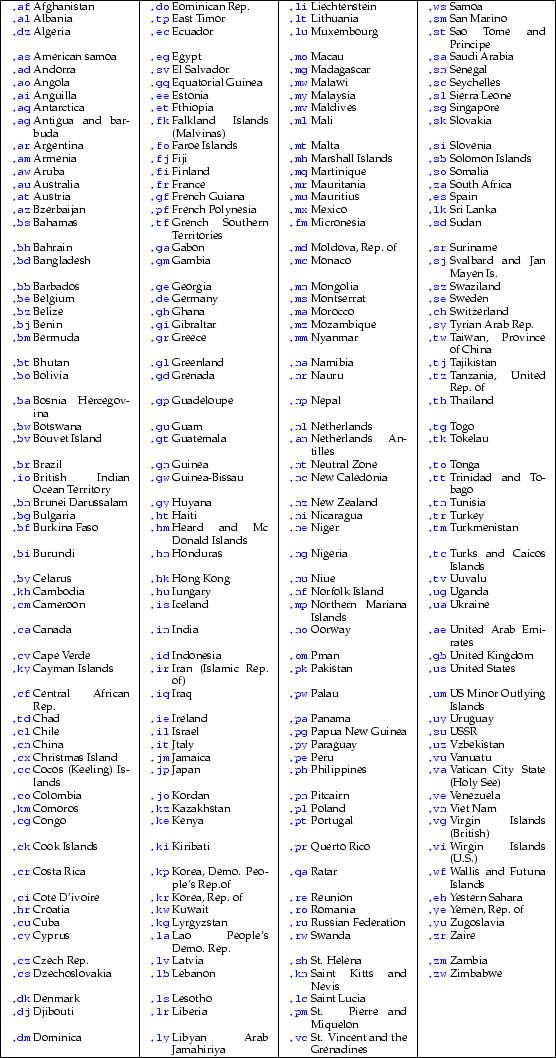
Within each country, a domain may have things before it for better description. Each country may implement a different structure. Some examples are:
.co.za- A South African
company. (za= Zuid Afrika, from Dutch.) .org.za- A South African nonprofit
organization. .ac.za- A South African
academic university. .edu.au- An
australian tertiaryeducational institution. .gov.za- A South African
government organization.
Note that a South African company might choose a
.com
domain instead of a
.co.za domain. The Internet has become
more commercialized than organized, meaning that anyone can
pretty much register any domain that is not already taken.
27.2 Resolving DNS Names to IP Addresses
In practice, a user will type a host name (say,
www.cranzgot.co.za) into some application like
a web browser. The
application has to then try find the IP address associated with
that name, in order to send packets to it. This section
describes the query structure used on the Internet so that
everyone can find out anyone else's IP address.
An obvious lookup infrastructure might involve distributing a long table of host name vs. IP numbers to every machine on the Internet. But as soon as you have more than a few thousand machines, this approach becomes impossible.
Another imaginary infrastructure might have one huge computer on the Internet somewhere whose IP address is known by everyone. This computer would be responsible for servicing requests for IP numbers, and the said application running on your local machine would just query this big machine. Of course, with billions of machines out there, this approach will obviously create far too much network traffic. [Actually, some Microsoft LANs kind of work this way--that is, not very well.]
27.2.1 The Internet DNS infrastructure
The DNS structure on the Internet actually works like this.
There are computers that service requests for IP numbers--millions of them. They are called name servers (or DNS servers), and a request is called a DNS lookup (or just a lookup). However, each name server only has information about a specific part of the Internet, and they constantly query each other.
There are 13 root name servers on the Internet. [This list can be
gotten from ftp://ftp.rs.internic.net/domain/named.root.]
5 10 |
a.root-servers.net 198.41.0.4b.root-servers.net 128.9.0.107c.root-servers.net 192.33.4.12d.root-servers.net 128.8.10.90e.root-servers.net 192.203.230.10f.root-servers.net 192.5.5.241g.root-servers.net 192.112.36.4h.root-servers.net 128.63.2.53i.root-servers.net 192.36.148.17j.root-servers.net 198.41.0.10k.root-servers.net 193.0.14.129 l.root-servers.net 198.32.64.12m.root-servers.net 202.12.27.33 |
Each country also has a name server, and in turn each
organization has a name server. Each name server only has
information about machines in its own domain, as well as
information about other name servers. The root name servers
only have information on the IP addresses of the name servers
of
.com,
.edu,
.za, etc. The
.za name
server only has information on the IP addresses of the name
servers of
.org.za,
.ac.za,
.co.za, etc. The
.co.za name server only has information
on the name servers of all South African companies, like
.cranzgot.co.za,
.icon.co.za,
.mweb.co.za, etc. The
.cranzgot.co.za,
name server only has info on the machines at Cranzgot Systems,
like
www.cranzgot.co.za.
Your own machine will defined in its configuration files a name server that is geographically close to it. The responsibilities of this name server will be to directly answer any queries about its own domain that it has information about and to answer any other queries by querying as many other name servers on the Internet as is necessary.
27.2.2 The name resolution process
Now our application is presented with
www.cranzgot.co.za. The following sequence of lookups
takes place to resolve this name into an IP address. This procedure
is called host name resolution and the algorithm that
performs this operation is called the resolver.
- The application checks certain special databases on the local machine. If it can get an answer directly from them, it proceeds no further.
- The application looks up a geographically close
name server from the local machine's configuration file.
Let's say this machine is called
ns. - The application queries
nswith ``www.cranzgot.co.za?''. nsdetermines whether that IP has been recently looked up. If it has, there is no need to ask further, since the result would be stored in a local cache.nschecks whether the domain is local. That is, whether it is a computer about which it has direct information. In this case, this would only be true if thenswerecranzgot.co.za's very own name server.nsstrips out the TLD (top level domain).za. It queries a root name server, asking what name server is responsible for.za. The answer will beucthpx.uct.ac.zaof IP address137.158.128.1.nsstrips out the next highest domainco.zaIt queries137.158.128.1, asking what name server is responsible for.co.za. The answer will besecdns1.posix.co.zaof IP address160.124.112.10.nsstrips out the next highest domaincranzgot.co.za. It queries160.124.112.10, asking what name server is responsible forcranzgot.co.za. The answer will bepizza.cranzgot.co.zaof IP address196.28.123.1.nsqueries196.28.123.1asking for the IP address ofwww.cranzgot.co.za. The answer will be160.123.176.1.nsreturns the result to the application.nsstores each of these results in a local cache with an expiration date, to avoid having to look them up a second time.
27.3 Configuring Your Local Machine
We referred to ``configuration files'' above. These are
actually the files:
/etc/host.conf,
/etc/hosts, and
/etc/resolv.conf. These are the three and only files that specify
how all applications are going to look up IP numbers; and have
nothing to do with the configuration files of the name server
daemon itself, even though a name server daemon might be
running on the local machine.
When an application needs to look up a host name, it goes through the
following procedure. [What is actually happening is that
the application is making a C library call to the function
gethostbyname(), hence all these configuration files really
belong to the C library packages
glibc or
libc.
However, this is a detail you need not be concerned about.] The
following are equivalent to steps 1, 2, and 3 above, with the details of the
configuration files filled in. The configuration files that
follow are taken from an actual installation.
- The application checks the file
/etc/host.conf. This file will usually have a lineorder hosts,bindin it, specifying that it should first (hosts) check the local database file/etc/hosts, and then (bind) query the name server specified in/etc/resolv.conf. The file/etc/hostscontains a plain text list of IP addresses and names. An example is given below. If the application can get an answer directly from/etc/hosts, it proceeds no further. - The application checks in the file
/etc/resolv.conffor a linenameserver <nameserver>. There can actually be three of these lines so that if one name server fails, the application can try the next in turn. - The application sends to the name server a query with the host name.
If the host name is unqualified, then the application, before trying the
query, appends to the host name a local domain name. A line
search <domain1> <domain2> ... <domainN>may appear in the configuration file to facilitate this. A query is made with each of<domain1>,<domain2>etc. appended in turn until the query successfully returns an IP. This just saves you having to type in the full host name for computers within your own organization. - The name server proceeds with the hierarchical queries described from step 4 onward.
The
/etc/hosts file should look something like this:
|
127.0.0.1 localhost.localdomain localhost192.168.3.9 cericon.cranzgot.co.za cericon192.168.3.10 pepper.cranzgot.co.za pepper192.168.2.1 onion.cranzgot.co.za onion |
The hosts
pepper,
cericon, and
onion are the
hosts that this machine has the most communication with, and hence are
listed here.
cericon is the local machine and must be listed. You
can list any hosts to which you want fast lookups, or hosts that might
need to be known in spite of name servers being down.
The
/etc/host.conf might look like this. All of the lines
are optional:
5 |
order hosts, bind, nistrim some.domainspoofalertnospoofmulti onreorder |
order- The order in which lookups are done. Don't try fiddling
with this value. It never seems to have any effect. You should leave it
as
order hosts,bind(ororder hosts,bind,nisif you are using NIS--search for theNIS-HOWTOon the web.) Once again,bindmeans to then go and check the/etc/resolv.confwhich holds the name server query options. trim- Strip the domain
some.domainfrom the end of a host name before trying a lookup. You will probably never require this feature. spoofalert- Try reverse lookups on a host name after looking up
the IP (i.e., do a query to find the name from the IP). If this query
does not return the correct result, it could mean that some machine is trying
to make it look like it is someone it really isn't. This is a hacker's
trick called spoofing.
spoofalertwarns you of such attempts in your log file/var/log/messages. nospoof- Disallow results that fail the spoof test.
multi on- Return more than one result if there are aliases.
Actually, a host can have several IP numbers, and an IP number
can have several host names. Consider a computer that might
want more than one name (
ftp.cranzgot.co.zaandwww.cranzgot.co.zaare the same machine.) Or a machine that has several networking cards and an IP address for each. This option should always be turned on.multi offis the alternative. Most applications use only the first value returned. reorder- If more than one IP is returned by a lookup, then sort that list according to the IP that has the most convenient network route.
Despite this array of options, an
/etc/host.conf
file almost always looks simply like
|
order hosts, bindmulti on |
The
/etc/resolv.conf file could look something like this:
5 |
nameserver 192.168.2.1nameserver 160.123.76.1nameserver 196.41.0.131search cranzgot.co.za ct.cranzgot.co.za uct.ac.zasortlist 192.168.3.0/255.255.255.0 192.168.2.0/255.255.255.0options ndots:1 timeout:30 attempts:2 rotate no-check-names inet6 |
nameserver- Specifies a name server to query. No more than three may be listed. The point of having more than one is to safeguard against a name server being down; the next in the list will then be queried.
search- If given a host name with less than
ndotsdots (i.e.,1in this case), add each of the domains in turn to the host name, trying a lookup with each. This option allows you to type in an unqualified host name and the application work out what organization it is belongs to from the search list. You can have up to six domains, but then queries would be time consuming. domain- The line ``
domain ct.cranzgot.co.za'' is the same as ``search ct.cranzgot.co.za cranzgot.co.za co.za''. Always usesearchexplicitly instead ofdomainto reduce the number of queries to a minimum. sortlist- If more than one host is returned, sort them
according to the following network
/masks. options- Various additional parameters can be specified in this one line:
ndots- Explained under
searchabove. The default is1. timeout- How long to wait before considering a query to have failed. The default is 30 seconds.
attempts- Number of attempts to make before failing. The default is 2. This means that a down name server will cause your application to wait 1 full minute before deciding that it can't resolve the IP.
rotate- Try the name servers in round robin fashion. This distributes load across name servers.
no-check-names- Don't check for invalid characters in host names.
inet6- The man page for
resolv.conf(resolver(5)) says:inet6 sets RES_USE_INET6 in _res.options . This has the ef- fect of trying a AAAA query before an A query inside the gethostbyname function, and of mapping IPv4 re- sponses in IPv6 ``tunnelled form'' if no AAAA records are found but an A record set exists.AnAAAAquery is a 128-bit ``next generation,'' or ``IPV6'' Internet address.
Despite this array of options, an
/etc/resolv.conf file almost always looks simply like:
|
nameserver 192.168.2.254search cranzgot.co.za |
27.4 Reverse Lookups
A reverse lookup, mentioned under
nospoof, is the
determining of the host name from the IP address. The course of queries is
similar to forward lookups using part of the IP address to find out what
machines are responsible for what ranges of IP address.
A forward lookup is an ordinary lookup of the IP address from the host name.
27.5 Authoritative for a Domain
I have emphasized that name servers only hold information for their own domains. Any other information they may have about another domain is cached, temporary data that has an expiration date attached to it.
The domain that a name server has information about is said to
be the domain that a name server is authoritative for.
Alternatively we say: ``a name server is authoritative
for the domain.'' For instance, the server
ns2.cranzgot.co.za is authoritative for the domain
cranzgot.co.za. Hence, lookups from anywhere on the Internet having the domain
cranzgot.co.za ultimately are the responsibility of
ns2.cranzgot.co.za, and originate (albeit through a long
series of caches) from the host
ns2.cranzgot.co.za.
27.6 The
host,
ping, and
whois Command
The command
host looks up a host name or an IP address, by doing
a name server query. Try
|
host www.cnn.com |
for an example of a host with lots of IP address. Keep typing
host
over and over. Notice that the order of the hosts keeps changing randomly.
This reordering distributes load among the many
cnn.com servers.
Now, pick one of the IP addresses and type
|
host <ip-address> |
This command will return the host name
cnn.com.
Note that the
host command is not
available on all UNIX systems.
The
ping command has nothing directly to do with DNS
but is a quick way of getting an IP address and at the same
time checking whether a host is responding. It is often used as the acid
test for network and DNS connectivity. See Section 25.10.1.
Now enter:
|
whois cnn.com@rs.internic.net |
(Note that original BSD
whois worked like
whois -h <host> <user>.)
You will get a response like this:
5 10 15 20 |
[rs.internic.net] Whois Server Version 1.1 Domain names in the .com, .net, and .org domains can now be registeredwith many different competing registrars. Go to http://www.internic.netfor detailed information. Domain Name: CNN.COM Registrar: NETWORK SOLUTIONS, INC. Whois Server: whois.networksolutions.com Referral URL: www.networksolutions.com Name Server: NS-01A.ANS.NET Name Server: NS-01B.ANS.NET Name Server: NS-02A.ANS.NET Name Server: NS-02B.ANS.NET Updated Date: 22-sep-1999 >>> Last update of whois database: Thu, 20 Jan 00 01:39:07 EST <<< The Registry database contains ONLY .COM, .NET, .ORG, .EDU domains andRegistrars. |
(Internic happens to have this database of
.com,
.net,
.org,
and
.edu domains.)
27.7 The
nslookup Command
nslookup is a program to interactively query a name server.
If you run
|
nslookup |
you will get a
> prompt at which you can type commands.
If you type in a host name,
nslookup will return its
IP address(s), and visa versa. Also, typing
|
help |
any time will return a complete list of commands. By default,
nslookup uses the first name server listed in
/etc/resolv.conf
for all its queries. However, the command
|
server <nameserver> |
will force
nslookup to connect to a name server of your choice.
27.7.1
NS,
MX,
PTR,
A and
CNAME records
The word record is a piece of DNS information.
Now enter the command:
|
set type=NS |
This tells
nslookup to return the second type of
information that a DNS can deliver: the authoritative name
server for a domain or the
NS record
of the domain. You can enter any domain here. For instance, if you enter
|
set type=NScnn.com |
nslookup returns
5 10 |
Non-authoritative answer:cnn.com nameserver = NS-02B.ANS.NETcnn.com nameserver = NS-02A.ANS.NETcnn.com nameserver = NS-01B.ANS.NETcnn.com nameserver = NS-01A.ANS.NET Authoritative answers can be found from:NS-02B.ANS.NET internet address = 207.24.245.178NS-02A.ANS.NET internet address = 207.24.245.179NS-01B.ANS.NET internet address = 199.221.47.8NS-01A.ANS.NET internet address = 199.221.47.7 |
This output tells us that four name servers are authoritative for the
domain
cnn.com (one plus three backups). It also tells us
that it did not get this answer from an authoritative source, but through
a cached source. It also tells us what name servers are
authoritative for this very information.
Now, switch to a name server that is authoritative for
cnn.com:
|
server NS-02B.ANS.NET |
and run the same query:
|
cnn.com |
The new result is somewhat more emphatic, but no different.
There are only a few other kinds of records that you can get from a name server. Try
|
set type=MXcnn.com |
to get the so-called
MX record for that domain. The
MX
record is the server responsible for handling mail destined to
that domain.
MX records also have a priority (usually
10 or 20). This tells any mail server to try the 20 one should
the 10 one fail, and so on. There are usually only one or two
MX records.
Mail is actually the only Internet service handled by
DNS. (For instance, there is no such thing as a NEWSX record for
news, or a WX record for web pages, whatever kind of
information we may like such records to hold.)
Also try
5 |
set type=PTR<ip-address>set type=A<hostname>set type=CNAME<hostname> |
So-called
PTR records are reverse lookups, or
Poin
Te
Rs to
host names. So-called
A records are forward lookups
(the default type of lookup when you first invoke
nslookup and the type of lookup the first half of this
chapter was most concerned with), or
Address lookups.
So-called
CNAME records are lookups of
Canonical
NAMEs. DNS allows
you to alias a computer to many different names, even though
each has one real name (called the canonical name).
CNAME lookups returns the machine name proper.
27.8 The
dig Command
dig stands for domain information groper.
It sends single requests to a DNS server for testing or scripting
purposes (it is similar to
nslookup, but
non-interactive).
It is usually used like,
|
dig @<server> <domain> <query-type> |
where
<server> is the machine running the DNS daemon
to query,
<domain> is the domain of interest and
<query-type> is one of
A,
ANY,
MX,
NS,
SOA,
HINFO,
or
AXFR--of
these, you can read about the non-obvious ones in
dig(1).
dig can also be used to test an Internet connection.
See Section 20.7.4.
Useful is the
AXFR record. For instance
|
dig @dns.dial-up.net icon.co.za AXFR |
lists the entire domain of one of our local ISPs.
Next: 28. Network File System, Up: rute Previous: 26. TCP and UDP Contents